
6. Playground
Try various .rst/Sphinx features here.
\(x+1+2\) is inline in math mode (with role).
One can use links to, e.g., Google, or add some footnotes [1], which can be tricky because of their positioning.
Also, you can reference previously defined labels with ease, or at
least in a consistent way.
Sadly, there is a lot of white space in .rst, and the markup is quite cumbersome to
remember.
You can also add some code with a nice code block (learn more about the possible options and available languages):
int main(void){
   return 0;
}
There are images as well.
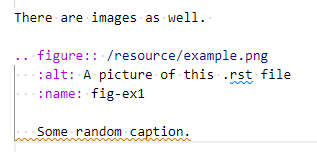
Figure 6.1 Some random caption.
This is the most obscure table syntax I know:
Treat |
Quantity |
Description |
|---|---|---|
Albatross |
2.99 |
On a stick! |
Crunchy Frog |
1.49 |
If we took the bones out, it wouldn’t be crunchy, now would it? |
Gannet Ripple |
1.99 |
On a stick! |
Luckily, we can also use a more natural table syntax.
A |
B |
|---|---|
1 |
1 |
0 |
1 |
And even
Treat |
Quantity |
Description |
|---|---|---|
Albatross |
2.99 |
On a stick! |
Crunchy Frog |
1.49 |
If we took the bones out, it wouldn’t be crunchy, now would it? |
Gannet Ripple |
1.99 |
On a stick! |
Really neat: Display keyboard shortcuts in a dedicated font: Ctrl+C. Formatting is strange, you can make things italic or bold, but other than that, I do not know.
Also, possibly interesting: we could have some .rst definition file with a lot of
definitions that can be re-used, e.g., \(r\) or \(\tau\).
The .rst format defines various header levels. These are as follows.
Level 0
====================================================================================

Level 1
------------------------------------------------------------------------------------

Level 2
~~~~~~~~~~~~~~~~~~~~~~~~~~~~~~~~~~~~~~~~~~~~~~~~~~~~~~~~~~~~~~~~~~~~~~~~~~~~~~~~~~~~

Level 3
^^^^^^^^^^^^^^^^^^^^^^^^^^^^^^^^^^^^^^^^^^^^^^^^^^^^^^^^^^^^^^^^^^^^^^^^^^^^^^^^^^^^

Level 4
''''''''''''''''''''''''''''''''''''''''''''''''''''''''''''''''''''''''''''''''''''

Level 5
++++++++++++++++++++++++++++++++++++++++++++++++++++++++++++++++++++++++++++++++++++

Level 6
************************************************************************************
We can also make lists, for example
With bullets
and more bullets
or with numbers, either
explicit, but then we have to take care that we
keep the numbering,
or it will be a syntax error,
or
implicit. Either way, we cannot skip
things